> ## Documentation Index
> Fetch the complete documentation index at: https://docs.bringin.app/llms.txt
> Use this file to discover all available pages before exploring further.
# Lightning Off-ramp
> Convert Bitcoin over Lightning to EUR — to a bank account or debit card
Convert sats to EUR. Send Bitcoin over Lightning, receive euros in a bank account via SEPA or on a Bringin debit card.
## Two Ways to Off-ramp
| Method | How it works | Best for |
| ------------------------ | --------------------------------------------------------------------------------------------------- | -------------------------------------- |
| **Lightning Connection** | Permanent standing order. Send sats to a Lightning address, EUR arrives in a bank account via SEPA. | Recurring off-ramps, automated payouts |
| **Debit Card Top-up** | One-off deposit. Send BTC on-chain, EUR loads onto a Bringin debit card. | Spending at merchants, ATM withdrawals |
***
## Lightning Connection (BTC → EUR via SEPA)
A connection is a permanent link between a Lightning address and a bank account. Once active, every payment to the Lightning address is automatically converted to EUR and sent via SEPA. No further API calls needed.
```mermaid theme={null}
flowchart LR
A[User's Lightning Wallet] -->|sats| B[Lightning Address]
B --> C[Bringin converts]
C -->|EUR via SEPA| D[User's Bank Account]
```
### Step 1: Get the API Key
Call `POST /application/connect` with the user's email. Bringin onboards the user and sends the per-user api-key to your webhook callback.
```bash theme={null}
POST /api/v0/application/connect
```
```json Request theme={null}
{
"email": "user@example.com",
"callback": "https://yourapp.com/bringin-webhooks",
"ref": "your-internal-user-id"
}
```
You receive the api-key via the `/verification-status` webhook once the user completes signup and KYC.
```json /verification-status webhook theme={null}
{
"userId": "f5cbb00c-d36b-4b0d-b8ef-f412757603df",
"apikey": "MDU4MTJlNjdkYWU1NGJiZGE0ZjAxNzQ4YzM0NWJlYmE=",
"verificationStatus": "APPROVED",
"ref": "your-internal-user-id"
}
```
See [API Keys](/guides/api-keys) for the full onboarding flow.
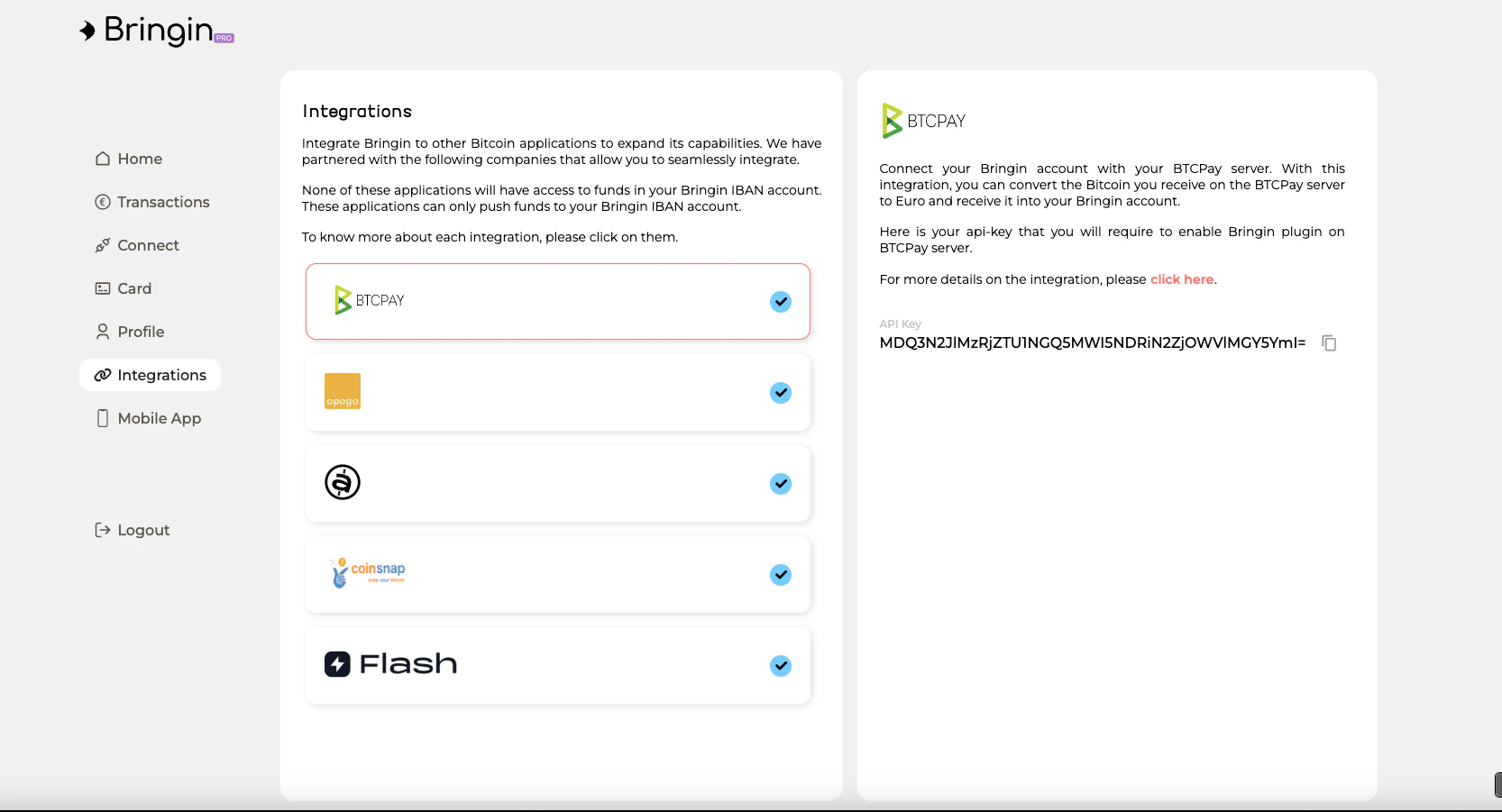
Ask users to grab their api-key from the **Integrations** tab in the [Bringin Dashboard](https://app.bringin.xyz) and paste it into your app.
 ### Step 2: Create the Lightning Connection
Once you have the api-key, create the connection using the BringinLink API.
**1. Create the connection**
```bash theme={null}
POST /api/v0/bringin-link
```
```json Request theme={null}
{
"name": "LN off-ramp",
"type": "CRYPTO_TO_FIAT",
"subtype": "LN",
"lnAddress": "alice@bringin.xyz",
"beneficiary": {
"iban": "DE89370400440532013000",
"bic": "COBADEFFXXX",
"name": "Alice Nakamoto"
}
}
```
```json Response (202) theme={null}
{
"bringinLink": {
"id": "550e8400-e29b-41d4-a716-446655440000",
"name": "LN off-ramp",
"type": "CRYPTO_TO_FIAT",
"subtype": "LN",
"status": "INITIATING"
}
}
```
**2. Poll for the challenge ID**
```bash theme={null}
GET /api/v0/bringin-link/{id}
```
Wait for `status: "PENDING"` and grab the `challengeId` from the standing order.
```json Response theme={null}
{
"bringinLink": {
"id": "550e8400-...",
"status": "PENDING"
},
"standingOrder": {
"status": "PENDING_CONFIRMATION",
"challengeId": "abc123",
"challengeExpiresAt": "2025-01-15T11:00:00.000Z"
},
"lnAddress": "alice@bringin.xyz"
}
```
**3. Confirm with SMS OTP**
```bash theme={null}
POST /api/v0/bringin-link/confirm
```
```json Request theme={null}
{
"challengeId": "abc123",
"verificationCode": "123456"
}
```
After confirmation, the connection is `ACTIVE`. Every Lightning payment to the address triggers automatic conversion and SEPA payout.
**4. List connections**
```bash theme={null}
GET /api/v0/bringin-link
```
Returns all connections for the user, including status and Lightning address details.
***
## Debit Card Top-up (BTC → EUR on Card)
Send BTC to a deposit address — on-chain or via Lightning. Bringin converts to EUR and loads the balance onto the user's debit card. Spend anywhere or withdraw at an ATM.
### 1. Get the BTC/EUR Rate
```bash theme={null}
POST /api/v0/offramp/rates
```
```json Request theme={null}
{
"ticker": "BTCEUR"
}
```
```json Response theme={null}
{
"ticker": "BTCEUR",
"price": "57000.00",
"bringinPrice": "56430.00",
"currency": "EUR",
"timestamp": 1742911487157
}
```
`bringinPrice` is the rate after fees — what the user actually gets.
### 2. Get a Deposit Address
```bash theme={null}
POST /api/v0/offramp/address
```
```json Request theme={null}
{
"sourceCurrency": "BTC",
"sourceBlockchain": "LIGHTNING"
}
```
```json Response theme={null}
{
"maximumDepositAmount": "500000",
"minimumDepositAmount": "500",
"address": "alice@bringin.xyz",
"blockchain": "LIGHTNING"
}
```
The user sends sats to the Lightning address. Settlement is instant.
Amounts are in **satoshis**. `500` = 500 sats minimum, `500000` = 500,000 sats maximum.
```json Request theme={null}
{
"ipAddress": "212.30.36.15",
"sourceCurrency": "BTC",
"sourceBlockchain": "BITCOIN"
}
```
```json Response theme={null}
{
"maximumDepositAmount": "10000000",
"minimumDepositAmount": "10000",
"address": "bc1qxy2kgdygjrsqtzq2n0yrf2493p83kkfjhx0wlh"
}
```
The user sends BTC to this address. Once confirmed on-chain, Bringin converts to EUR and loads the debit card.
### 3. Check Balance and Transactions
```bash theme={null}
POST /api/v0/account/get-balance
```
```json Request theme={null}
{
"currency": "EUR"
}
```
```json Response theme={null}
{
"balance": "12992"
}
```
Balance is in **EUR cents**. `12992` = 129.92.
***
## Webhooks
All webhooks fire to the `callback` URL you provided. Bringin appends the event path.
| Webhook | Fires when |
| ---------------------- | -------------------------------------------------------------- |
| `/verification-status` | User completes KYC. Contains the per-user `apikey`. |
| `/order-status` | Debit card top-up succeeds or fails. |
| `/connection-status` | Lightning connection becomes active. Contains the `lnAddress`. |
See [Webhooks](/webhooks) for full payload details.
***
## Authentication
All requests require an `api-key` header.
```bash theme={null}
api-key: ZTY3YzNhMzQ3Yzk4NGJjMmEwZWU1NTQ4NmE5MjJjZTk=
```
### Getting Your API Key
Your users can grab their API key from the **Bringin Dashboard** under the **Integrations** tab. Click on the partner integration to reveal the key.
* **Production:** [app.bringin.xyz](https://app.bringin.xyz)
* **Sandbox:** [dev-app.bringin.xyz](https://dev-app.bringin.xyz)
### Key Types
| Key | Use |
| ---------------- | ------------------------------------------------------- |
| **Master key** | `POST /application/connect`, rate checks |
| **Per-user key** | Creating orders, managing connections, checking balance |
Per-user keys have limited permissions — they can only push crypto for conversion. Safe to store on client devices.
HMAC signing is required only for `POST /application/connect` with a callback URL. See [HMAC Signing](/authentication/hmac-signing).
***
## Testing
| Item | Value |
| ------------ | -------------------------------------------------- |
| API Base URL | `https://dev.bringin.xyz` |
| Dashboard | [dev-app.bringin.xyz](https://dev-app.bringin.xyz) |
See [Sandbox](/sandbox) for test credentials and setup.
### Step 2: Create the Lightning Connection
Once you have the api-key, create the connection using the BringinLink API.
**1. Create the connection**
```bash theme={null}
POST /api/v0/bringin-link
```
```json Request theme={null}
{
"name": "LN off-ramp",
"type": "CRYPTO_TO_FIAT",
"subtype": "LN",
"lnAddress": "alice@bringin.xyz",
"beneficiary": {
"iban": "DE89370400440532013000",
"bic": "COBADEFFXXX",
"name": "Alice Nakamoto"
}
}
```
```json Response (202) theme={null}
{
"bringinLink": {
"id": "550e8400-e29b-41d4-a716-446655440000",
"name": "LN off-ramp",
"type": "CRYPTO_TO_FIAT",
"subtype": "LN",
"status": "INITIATING"
}
}
```
**2. Poll for the challenge ID**
```bash theme={null}
GET /api/v0/bringin-link/{id}
```
Wait for `status: "PENDING"` and grab the `challengeId` from the standing order.
```json Response theme={null}
{
"bringinLink": {
"id": "550e8400-...",
"status": "PENDING"
},
"standingOrder": {
"status": "PENDING_CONFIRMATION",
"challengeId": "abc123",
"challengeExpiresAt": "2025-01-15T11:00:00.000Z"
},
"lnAddress": "alice@bringin.xyz"
}
```
**3. Confirm with SMS OTP**
```bash theme={null}
POST /api/v0/bringin-link/confirm
```
```json Request theme={null}
{
"challengeId": "abc123",
"verificationCode": "123456"
}
```
After confirmation, the connection is `ACTIVE`. Every Lightning payment to the address triggers automatic conversion and SEPA payout.
**4. List connections**
```bash theme={null}
GET /api/v0/bringin-link
```
Returns all connections for the user, including status and Lightning address details.
***
## Debit Card Top-up (BTC → EUR on Card)
Send BTC to a deposit address — on-chain or via Lightning. Bringin converts to EUR and loads the balance onto the user's debit card. Spend anywhere or withdraw at an ATM.
### 1. Get the BTC/EUR Rate
```bash theme={null}
POST /api/v0/offramp/rates
```
```json Request theme={null}
{
"ticker": "BTCEUR"
}
```
```json Response theme={null}
{
"ticker": "BTCEUR",
"price": "57000.00",
"bringinPrice": "56430.00",
"currency": "EUR",
"timestamp": 1742911487157
}
```
`bringinPrice` is the rate after fees — what the user actually gets.
### 2. Get a Deposit Address
```bash theme={null}
POST /api/v0/offramp/address
```
```json Request theme={null}
{
"sourceCurrency": "BTC",
"sourceBlockchain": "LIGHTNING"
}
```
```json Response theme={null}
{
"maximumDepositAmount": "500000",
"minimumDepositAmount": "500",
"address": "alice@bringin.xyz",
"blockchain": "LIGHTNING"
}
```
The user sends sats to the Lightning address. Settlement is instant.
Amounts are in **satoshis**. `500` = 500 sats minimum, `500000` = 500,000 sats maximum.
```json Request theme={null}
{
"ipAddress": "212.30.36.15",
"sourceCurrency": "BTC",
"sourceBlockchain": "BITCOIN"
}
```
```json Response theme={null}
{
"maximumDepositAmount": "10000000",
"minimumDepositAmount": "10000",
"address": "bc1qxy2kgdygjrsqtzq2n0yrf2493p83kkfjhx0wlh"
}
```
The user sends BTC to this address. Once confirmed on-chain, Bringin converts to EUR and loads the debit card.
### 3. Check Balance and Transactions
```bash theme={null}
POST /api/v0/account/get-balance
```
```json Request theme={null}
{
"currency": "EUR"
}
```
```json Response theme={null}
{
"balance": "12992"
}
```
Balance is in **EUR cents**. `12992` = 129.92.
***
## Webhooks
All webhooks fire to the `callback` URL you provided. Bringin appends the event path.
| Webhook | Fires when |
| ---------------------- | -------------------------------------------------------------- |
| `/verification-status` | User completes KYC. Contains the per-user `apikey`. |
| `/order-status` | Debit card top-up succeeds or fails. |
| `/connection-status` | Lightning connection becomes active. Contains the `lnAddress`. |
See [Webhooks](/webhooks) for full payload details.
***
## Authentication
All requests require an `api-key` header.
```bash theme={null}
api-key: ZTY3YzNhMzQ3Yzk4NGJjMmEwZWU1NTQ4NmE5MjJjZTk=
```
### Getting Your API Key
Your users can grab their API key from the **Bringin Dashboard** under the **Integrations** tab. Click on the partner integration to reveal the key.
* **Production:** [app.bringin.xyz](https://app.bringin.xyz)
* **Sandbox:** [dev-app.bringin.xyz](https://dev-app.bringin.xyz)
### Key Types
| Key | Use |
| ---------------- | ------------------------------------------------------- |
| **Master key** | `POST /application/connect`, rate checks |
| **Per-user key** | Creating orders, managing connections, checking balance |
Per-user keys have limited permissions — they can only push crypto for conversion. Safe to store on client devices.
HMAC signing is required only for `POST /application/connect` with a callback URL. See [HMAC Signing](/authentication/hmac-signing).
***
## Testing
| Item | Value |
| ------------ | -------------------------------------------------- |
| API Base URL | `https://dev.bringin.xyz` |
| Dashboard | [dev-app.bringin.xyz](https://dev-app.bringin.xyz) |
See [Sandbox](/sandbox) for test credentials and setup.