Convert sats to EUR. Send Bitcoin over Lightning, receive euros in a bank account via SEPA or on a Bringin debit card.

Two Ways to Off-ramp

MethodHow it worksBest for
Lightning ConnectionPermanent standing order. Send sats to a Lightning address, EUR arrives in a bank account via SEPA.Recurring off-ramps, automated payouts
Debit Card Top-upOne-off deposit. Send BTC on-chain, EUR loads onto a Bringin debit card.Spending at merchants, ATM withdrawals

Lightning Connection (BTC → EUR via SEPA)

A connection is a permanent link between a Lightning address and a bank account. Once active, every payment to the Lightning address is automatically converted to EUR and sent via SEPA. No further API calls needed.

Step 1: Get the API Key

Call POST /application/connect with the user’s email. Bringin onboards the user and sends the per-user api-key to your webhook callback.
POST /api/v0/application/connect
Request
{
  "email": "user@example.com",
  "callback": "https://yourapp.com/bringin-webhooks",
  "ref": "your-internal-user-id"
}
You receive the api-key via the /verification-status webhook once the user completes signup and KYC.
/verification-status webhook
{
  "userId": "f5cbb00c-d36b-4b0d-b8ef-f412757603df",
  "apikey": "MDU4MTJlNjdkYWU1NGJiZGE0ZjAxNzQ4YzM0NWJlYmE=",
  "verificationStatus": "APPROVED",
  "ref": "your-internal-user-id"
}
See API Keys for the full onboarding flow.

Step 2: Create the Lightning Connection

Once you have the api-key, create the connection using the BringinLink API. 1. Create the connection
POST /api/v0/bringin-link
Request
{
  "name": "LN off-ramp",
  "type": "CRYPTO_TO_FIAT",
  "subtype": "LN",
  "lnAddress": "alice@bringin.xyz",
  "beneficiary": {
    "iban": "DE89370400440532013000",
    "bic": "COBADEFFXXX",
    "name": "Alice Nakamoto"
  }
}
Response (202)
{
  "bringinLink": {
    "id": "550e8400-e29b-41d4-a716-446655440000",
    "name": "LN off-ramp",
    "type": "CRYPTO_TO_FIAT",
    "subtype": "LN",
    "status": "INITIATING"
  }
}
2. Poll for the challenge ID
GET /api/v0/bringin-link/{id}
Wait for status: "PENDING" and grab the challengeId from the standing order.
Response
{
  "bringinLink": {
    "id": "550e8400-...",
    "status": "PENDING"
  },
  "standingOrder": {
    "status": "PENDING_CONFIRMATION",
    "challengeId": "abc123",
    "challengeExpiresAt": "2025-01-15T11:00:00.000Z"
  },
  "lnAddress": "alice@bringin.xyz"
}
3. Confirm with SMS OTP
POST /api/v0/bringin-link/confirm
Request
{
  "challengeId": "abc123",
  "verificationCode": "123456"
}
After confirmation, the connection is ACTIVE. Every Lightning payment to the address triggers automatic conversion and SEPA payout. 4. List connections
GET /api/v0/bringin-link
Returns all connections for the user, including status and Lightning address details.

Debit Card Top-up (BTC → EUR on Card)

Send BTC to a deposit address — on-chain or via Lightning. Bringin converts to EUR and loads the balance onto the user’s debit card. Spend anywhere or withdraw at an ATM.

1. Get the BTC/EUR Rate

POST /api/v0/offramp/rates
Request
{
  "ticker": "BTCEUR"
}
Response
{
  "ticker": "BTCEUR",
  "price": "57000.00",
  "bringinPrice": "56430.00",
  "currency": "EUR",
  "timestamp": 1742911487157
}
bringinPrice is the rate after fees — what the user actually gets.

2. Get a Deposit Address

POST /api/v0/offramp/address
Request
{
  "sourceCurrency": "BTC",
  "sourceBlockchain": "LIGHTNING"
}
Response
{
  "maximumDepositAmount": "500000",
  "minimumDepositAmount": "500",
  "address": "alice@bringin.xyz",
  "blockchain": "LIGHTNING"
}
The user sends sats to the Lightning address. Settlement is instant.
Amounts are in satoshis. 500 = 500 sats minimum, 500000 = 500,000 sats maximum.

3. Check Balance and Transactions

POST /api/v0/account/get-balance
Request
{
  "currency": "EUR"
}
Response
{
  "balance": "12992"
}
Balance is in EUR cents. 12992 = 129.92.

Webhooks

All webhooks fire to the callback URL you provided. Bringin appends the event path.
WebhookFires when
/verification-statusUser completes KYC. Contains the per-user apikey.
/order-statusDebit card top-up succeeds or fails.
/connection-statusLightning connection becomes active. Contains the lnAddress.
See Webhooks for full payload details.

Authentication

All requests require an api-key header.
api-key: ZTY3YzNhMzQ3Yzk4NGJjMmEwZWU1NTQ4NmE5MjJjZTk=

Getting Your API Key

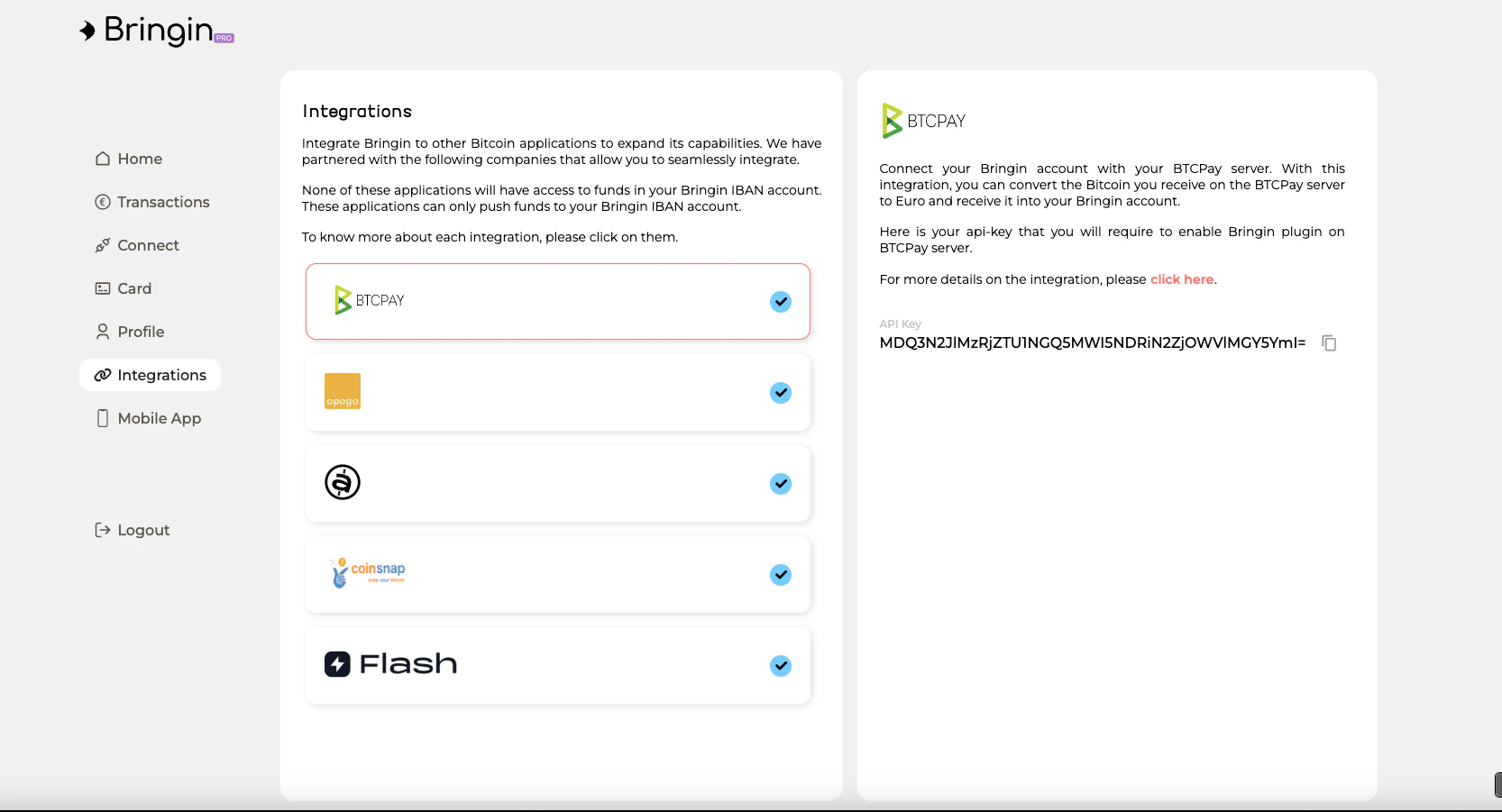
Your users can grab their API key from the Bringin Dashboard under the Integrations tab. Click on the partner integration to reveal the key.
Key Types

KeyUse
Master keyPOST /application/connect, rate checks
Per-user keyCreating orders, managing connections, checking balance
Per-user keys have limited permissions — they can only push crypto for conversion. Safe to store on client devices.
HMAC signing is required only for POST /application/connect with a callback URL. See HMAC Signing.

Testing

ItemValue
API Base URLhttps://dev.bringin.xyz
Dashboarddev-app.bringin.xyz
See Sandbox for test credentials and setup.